

July 14, 2026
Summary: In this tutorial, you’ll learn best practices and architecture guide for the JSON data type in PostgreSQL.
Table of Contents
Core Viewpoints
Many developers find the JSON/JSONB data type in PostgreSQL hard to control, even viewing it as a “beast” that destroys database schemas. However, the core advantage of JSON lies in Schema Freedom. By combining this freedom with relational database best practices, proper design, and indexing strategies, you can perfectly harness the power of the JSON data type.
In one sentence: Do not cram all your data into a single massive JSON object; instead, selectively extract key fields to maintain relational integrity and storage performance.
Database Design Principles & Checklist
To maintain database performance while preserving JSON flexibility, follow these two major design principles:
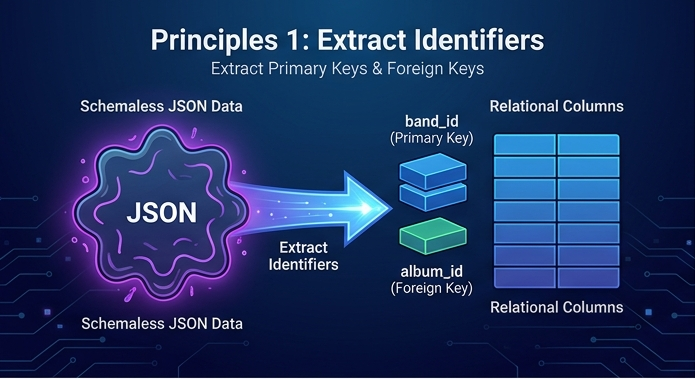
1. Extract Unique Identifiers to Establish Primary/Foreign Keys
- Pain Point: JSON objects support internal uniqueness constraints but cannot directly establish foreign key relationships between tables (e.g., associating an “album” with a “band”).
- Method: Forcefully extract ID fields from the JSON (such as
band_id,album_id) into independent regular columns (e.g.,BIGINTtype) and set them as primary and foreign keys. This preserves the dynamic extensibility of the details object while maintaining the referential integrity of the relational database.
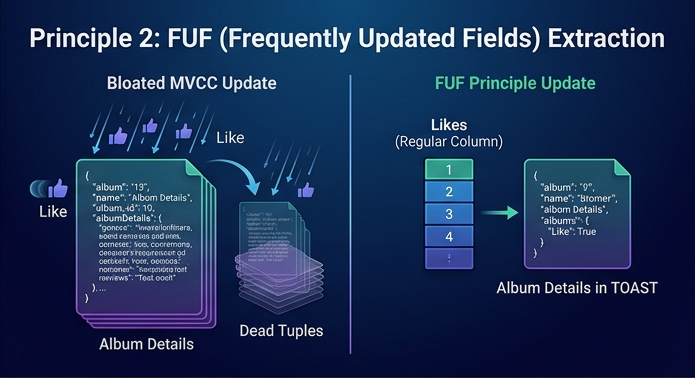
2. Adopt the FUF Principle (Frequently Updated Fields Extraction)
- Pain Point: Under PostgreSQL’s MVCC (Multi-Version Concurrency Control) mechanism, frequently updating a tiny field (like the number of likes or shares on an article) inside a large JSON object causes the entire row to be marked as dead and rewritten. This generates a massive amount of “Dead Rows” (dead tuples), leading to severe storage bloat.
- Method: Identify FUF (Frequently Updated Fields), such as
likes,shares, etc., and strip them out of the JSON object to store them as regular table columns. - Benefits: When updating these metrics, if the main large JSON is stored in a TOAST table (the mechanism for extra-long data storage), updating the regular columns will no longer trigger a rewrite of the huge JSON object, drastically reducing storage overhead and I/O costs.
3. Extract fields commonly used for filter queries
- Pain Point: For most types Postgres will collect a ton of statistics: a histogram, the most common values, and more. For json, Postgres captures no meaningful statistics. Instead what Postgres does is when you filter on a json column, it estimates the filter will match 0.1% of rows. The 0.1% is a magic number instead of being calculated based on your data. The right number could be 80% or it could be 0.0001%.
- Method: Identify fields commonly used for filter queries, and strip them out of the JSON object to store them as regular table columns.
Indexing Strategy Comparison for JSON Data
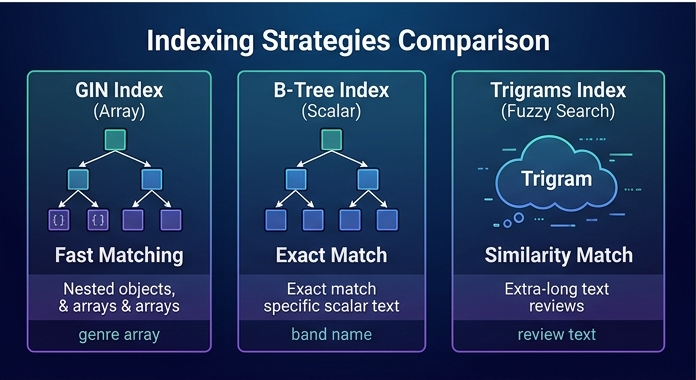
Understanding the internal data structure of JSON is key to choosing the right index. The following provides a comparison of indexing methods for three typical scenarios:
| Index Type | Applicable Scenario | Syntax Key Points | Characteristics & Advantages |
|---|---|---|---|
| GIN Index | Nested Composite Types (e.g., genre arrays inside JSON) | Use a single arrow -> to extract the JSON element object itself for indexing. |
Best suited for inverted indexes, capable of quickly matching elements within JSON arrays or composite objects. |
| B-Tree Index | Pure Scalar Values (e.g., band names of text type) | Use a double arrow ->> to extract specific text (Text) and build a B-tree on it. |
The most common and efficient query method, suitable for exact scalar matching. |
| Trigrams Index | Fuzzy Search for Extra-Long Text (e.g., lengthy album reviews) | Install the pg_trgm extension, and combine ->> text extraction with a GIN index. |
Computes similarity based on 3-grams, making queries extremely fast with relatively small index sizes. |
JSON Data Constraints and Strong Typing (Step-by-Step)
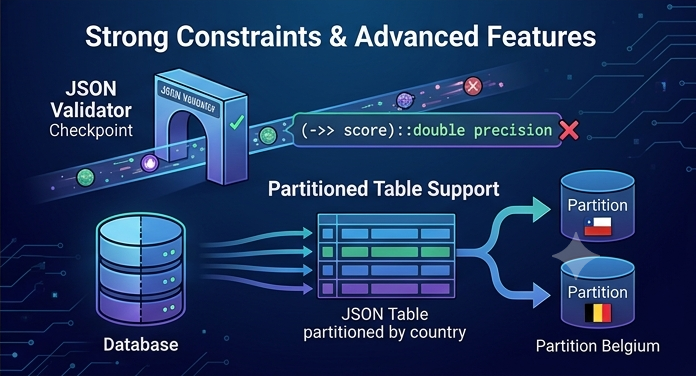
For JSON fields that require strict data consistency, you can implement strong type constraints, breaking the stereotype that “JSON cannot restrict types”:
- Cast Indexing Verification:
When creating an index, you can force-cast the text extracted by the double arrow
->>into a specific type. For example:(band->>'score')::double precision. If someone attempts to insert a value that cannot be converted to a double-precision float, the database will reject it and throw an error. - Table Constraints:
Use the
ALTER TABLE ... ADD CONSTRAINTcommand combined with validation functions (such aspg_input_is_valid) to ensure that the input data strictly conforms to the expected data type. - JSON Schema-level Constraints: Restrict the data shape of specific fields within the JSON using check constraints. For example, force a field to always be a “JSON array”, preventing users from accidentally entering a single text value where an array is expected.
Other Advanced Features
Partitioned Table Support: Tables containing JSON also support PostgreSQL’s table partitioning feature. For instance, you can extract a “country” field from the JSON object as a partition key to perform List Partitioning, which is highly feasible in specific massive data scenarios.
Important Conclusion
JSON is not meant to subvert the relational architecture; rather, it is designed to fill the need for “dynamic attributes” in business scenarios. Extracting relational identifiers, stripping out high-frequency update columns, precisely matching underlying indexes, and adding necessary strong type constraints is the correct way for modern developers to master JSON in PostgreSQL.
Reference
JSON in PostgreSQL - evil data type or just needs to be tamed?
See more
PostgreSQL Tutorial: Data Types
PostgreSQL Documentation: JSON Types