

July 7, 2026
As applications grow, PostgreSQL tables inevitably scale from thousands of records to hundreds of millions or even billions. Performance degradation for large tables is rarely sudden; instead, it happens through a process of silent degradation over time.
Table of Contents
Here is a comprehensive overview of the 7 hidden technical risks faced during large table maintenance and the corresponding 4 core optimization strategies from the presentation:
The 7 Core Challenges of Maintaining Large Tables
1. Autovacuum Inefficiency and Table/Index Bloat
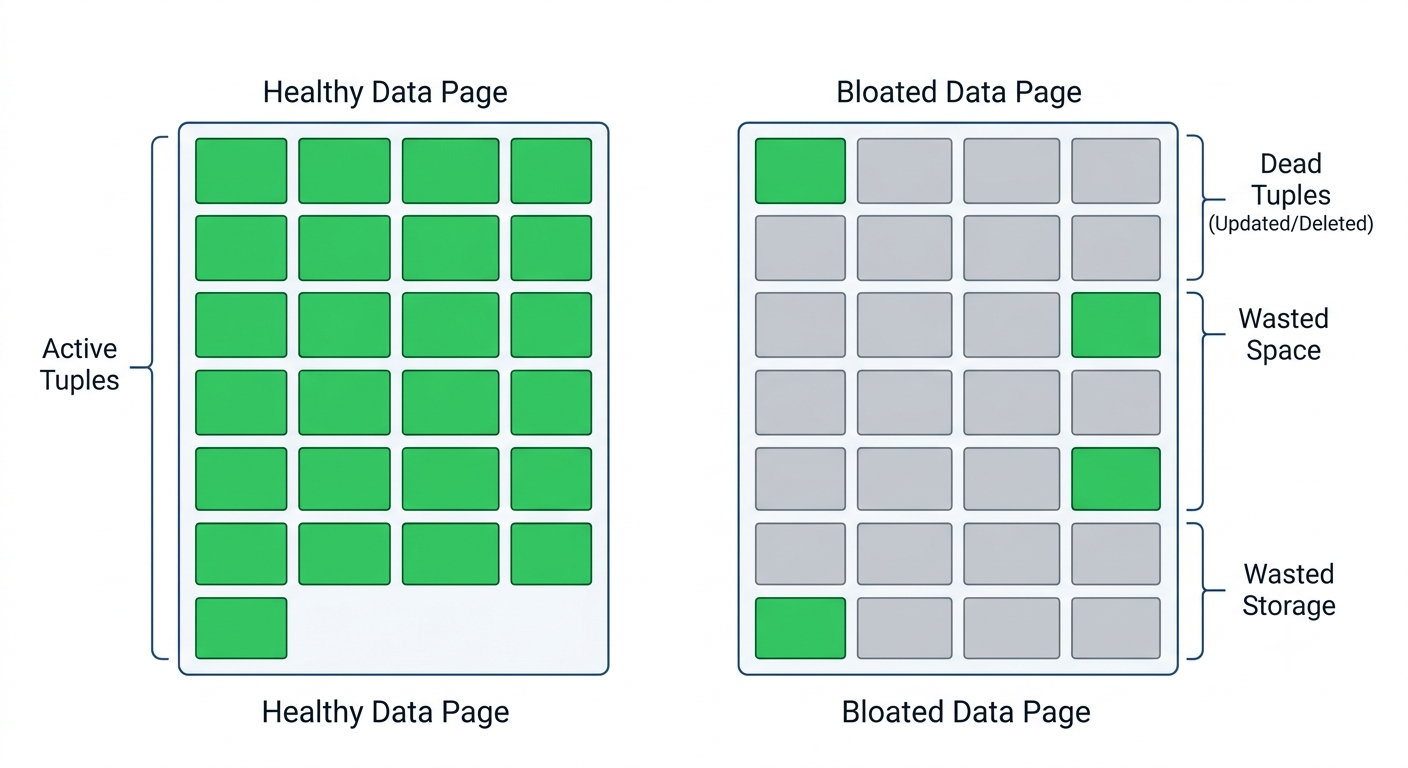
- Root Cause: Under heavy concurrent write workloads involving frequent
UPDATEorDELETEoperations, the defaultautovacuumdaemon cannot keep up with the rapid accumulation of dead tuples. - Symptoms: The physical storage size of tables expands far beyond active data, and indexes become severely bloated.
- Impact: This triggers more physical pages to be read from disk, drops the cache hit ratio, increases random I/O latency, and significantly slows down queries.
2. Caching Inefficiency (Buffer Cache Thrashing)
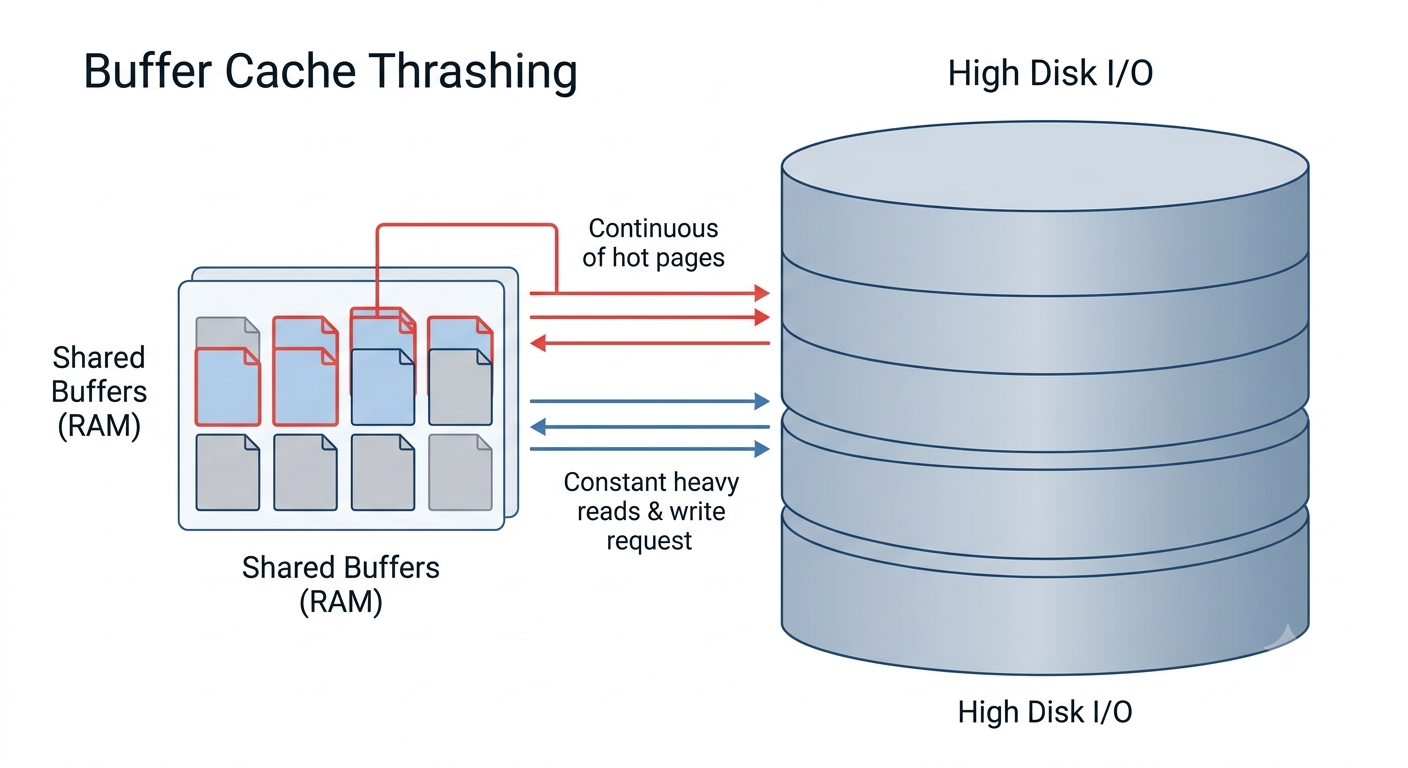
- Root Cause: The active working set of data for a large table exceeds the server’s available RAM.
- Symptoms: This causes buffer cache thrashing. As new queries hit the database, hot pages are continuously evicted from memory, forcing queries to repeatedly hit the disk instead of utilizing the cache.
- Impact: The database
shared_buffersbecome ineffective. Even if CPU resources are abundant, the system becomes heavily I/O-bound, causing a throughput plateau where the workload can no longer scale.
3. Vacuum Freeze Storms
Core Mechanism: The default value for autovacuum_freeze_max_age is 200 million transactions. When a table’s transaction age reaches or exceeds this threshold, PostgreSQL forces an aggressive “anti-wraparound vacuum” to prevent transaction ID wraparound.
Vulnerable Scenarios:
- Write-intensive workloads: Transaction age grows rapidly, outpacing regular vacuums.
- Insert-only workloads: Since no dead tuples are generated, regular vacuums never kick in, leaving the table unmaintained until it suddenly hits the freeze max age.
Impact: Anti-wraparound vacuums are highly resource-intensive (causing heavy I/O and CPU spikes). They force full table scans, freeze table tuples, and rebuild visibility maps, allowing background maintenance to dominate the server and cause unpredictable query latencies.
4. WAL Volume Explosion
Symptoms: Write-heavy workloads with millions of bulk inserts, updates, or deletes drastically accelerate the Write-Ahead Log (WAL) generation rate, shifting the system from random data I/O to sequential WAL-dominated I/O.
Chain Reactions:
- Checkpoints are triggered too frequently, shifting from being “timed” to “requested” due to space limits, causing massive I/O peaks.
- Full-page writes (FPW) after checkpoints are heavily amplified.
- Lightweight locks (LW locks) related to WAL writes cause severe contention, driving up commit latencies.
- If replicas cannot sustain the workload, replication lag grows, causing replication slots to retain massive amounts of WAL, which can lead to disk-full issues.
5. Lock Contention Amplification
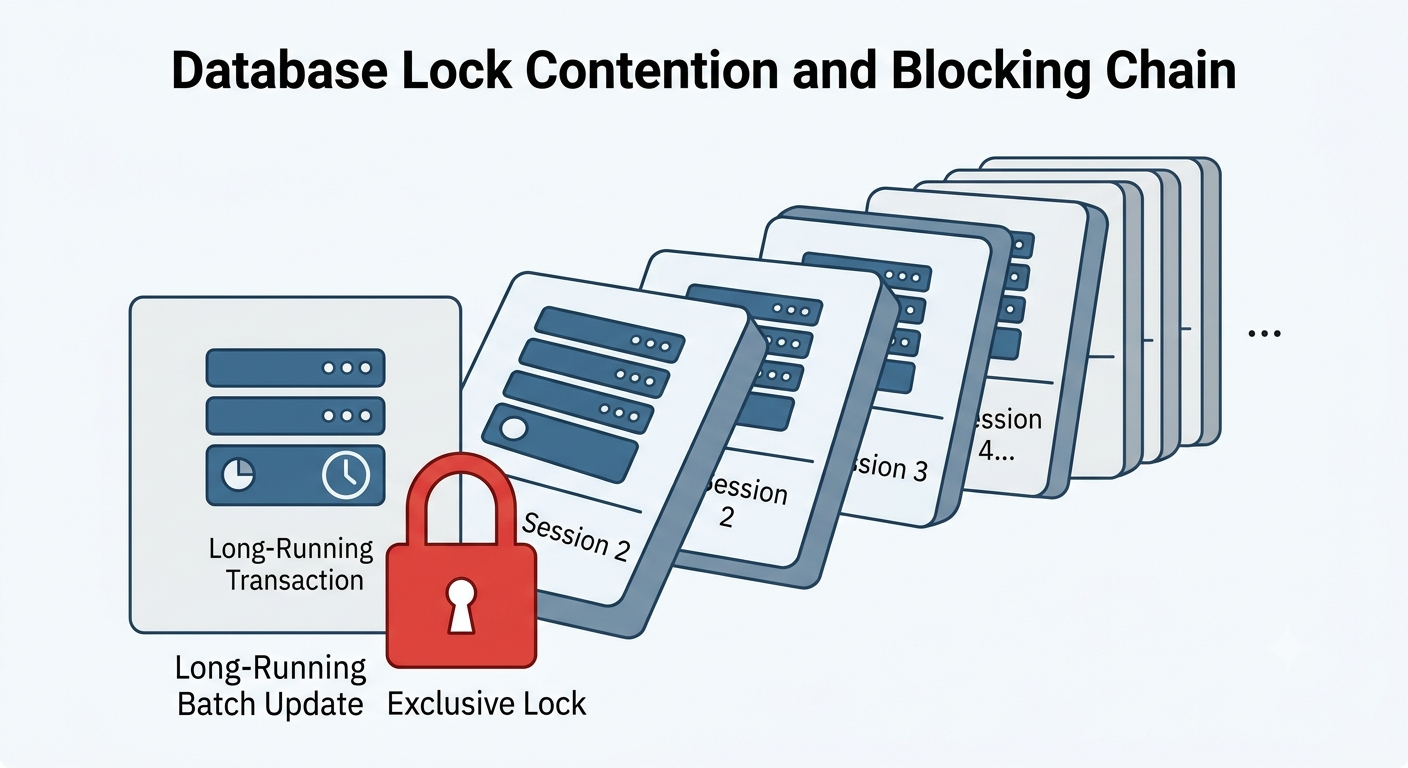
- Scenarios: Long-running transactions (such as batch updates or ETL jobs) or high concurrency on the same hot rows, indexes, or tables.
- Impact: Hot rows or tables are locked for extended periods, creating a cascading blocking chain for other sessions. This causes system-wide latency spikes; even fast queries and application-layer sessions get piled up behind the slow or locked transactions.
6. Statistics Staleness
- Root Cause: As data volume grows and distribution changes, default
ANALYZEsamples become unrepresentative, causing histograms and Most Common Values (MCV) to drift. - Impact: The query planner uses inaccurate cardinality estimates, and these misestimates propagate across joins. Ultimately, the optimizer picks highly inefficient execution plans, triggering sudden query regressions and performance spikes.
7. HOT (Heap-Only Tuple) Update Failures
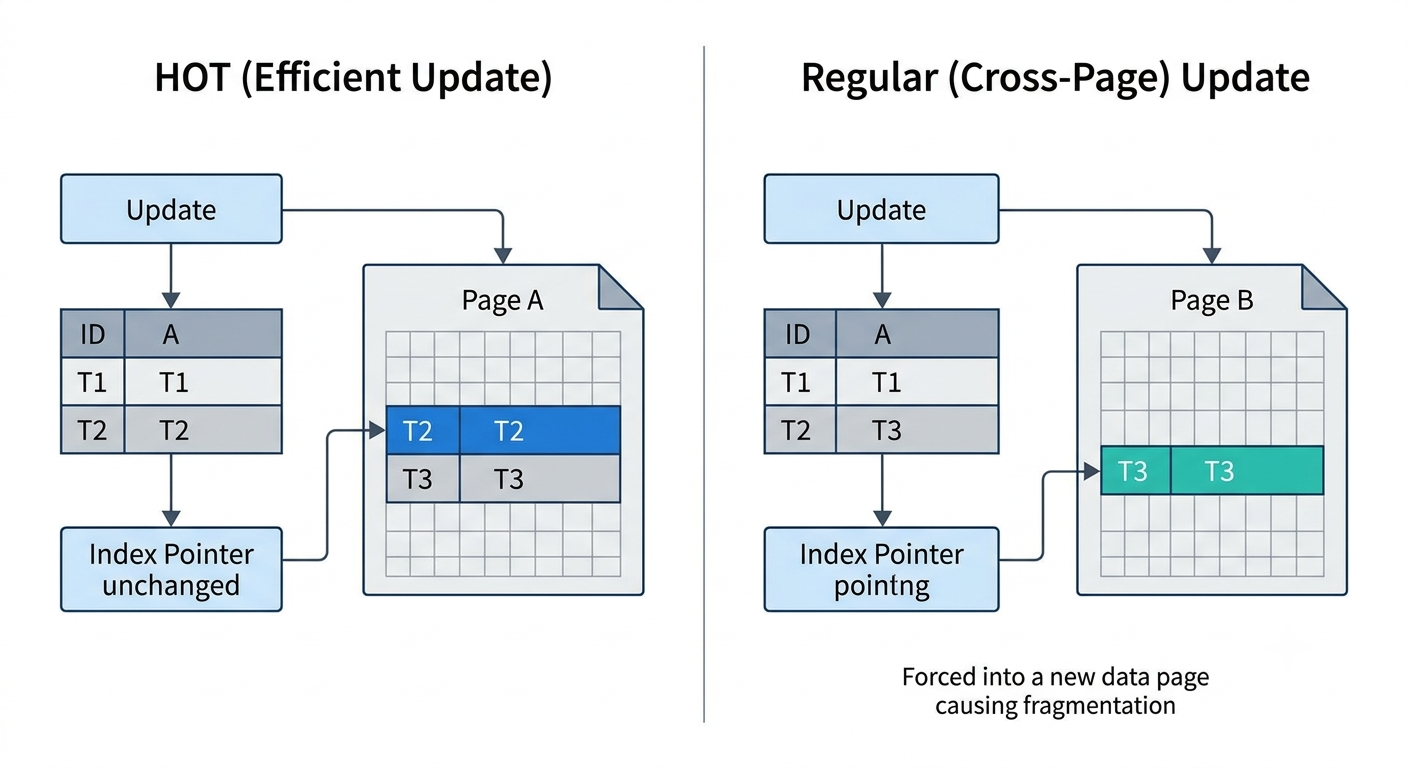
- Internal Principle: Due to PostgreSQL’s MVCC architecture, an update deletes the existing row version and adds a new one. If the new version fits within the same data page, a HOT update occurs, and index pointers do not need to change. However, if the page runs out of space, the new version is forced into a new page location.
- Impact: HOT update failures lead to cross-page and index churn, generating more page splits WAL and accelerating write amplification. This increases I/O pressure and latency under write-heavy workloads.
Core Performance Optimization Strategies
1. Implement Table Partitioning
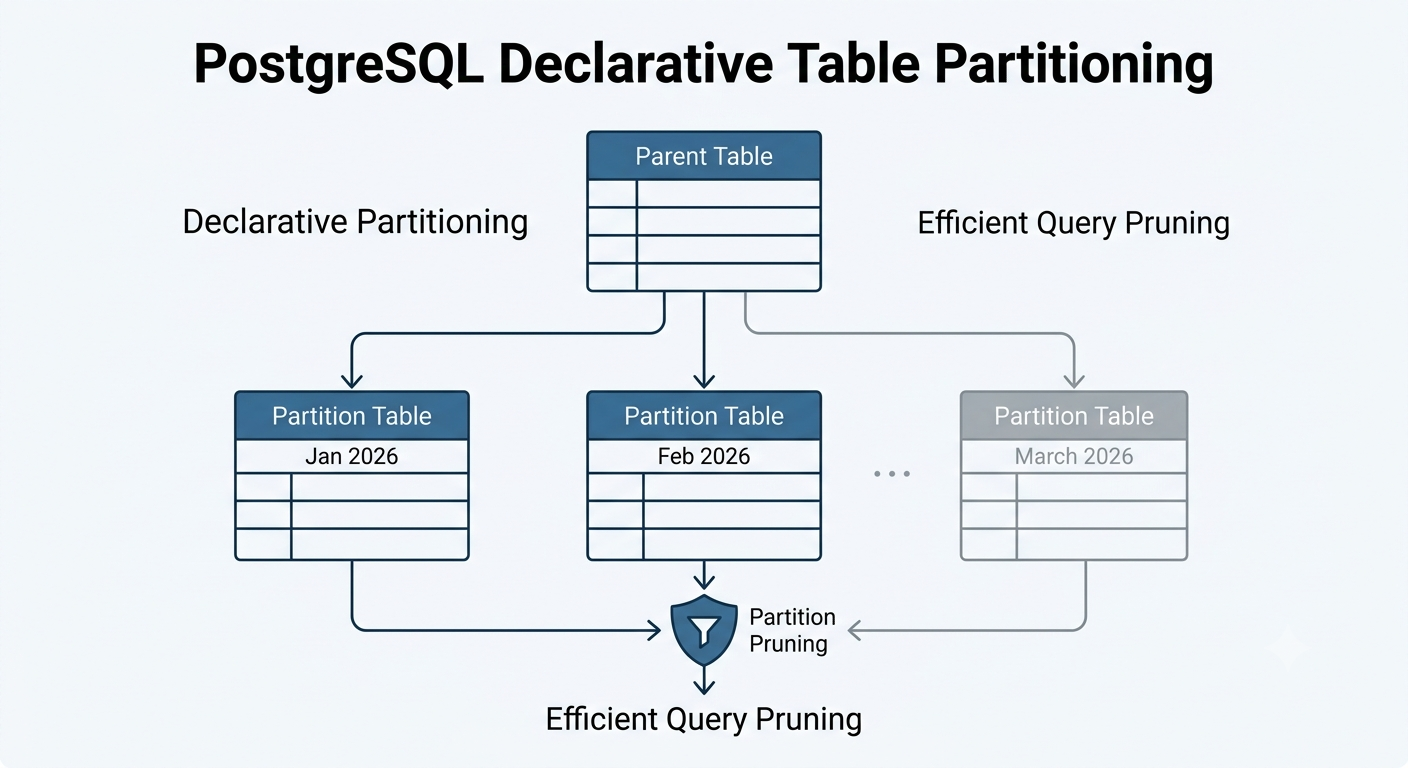
For massive tables exceeding 500GB or 1TB, maintaining a single flat table is discouraged. Instead, implement time-based or key-based partitioning.
- Key Advantages: Keeps the query working set small; makes vacuum maintenance highly targeted and localized; ensures index sizes stay within RAM limits; restricts the scope of locks.
- Implementation Key: Ensure application queries are optimized to trigger partition pruning. Otherwise, the query planner will still scan all partitions to retrieve data, defeating the purpose of optimization.
- Monitoring Focus: Track physical partition sizes, the number of sequential scans, and index scans via system views (
pg_stat_user_tables), adding targeted indexes as necessary.
2. Fine-Tune Autovacuum
Break through automatic cleanup bottlenecks by tuning parameters across four dimensions based on the characteristics of your large tables:
- Adjust Global Parameters: If the schema contains multiple large tables (100GB+), lower
autovacuum_vacuum_scale_factorandautovacuum_analyze_scale_factorfrom the default 20% / 10% to 10%, 5%, or lower. This ensures large tables are picked up and vacuumed more frequently. If the server has sufficient I/O bandwidth and IOPS, increaseautovacuum_vacuum_cost_limitto speed up vacuums. - Table-Level Customization: For skewed schemas (e.g., one 1TB table and a hundred 1GB tables), configure lower scale factors, higher cost limits, or explicit dead tuple thresholds specifically at the table level for the large table.
- Schedule Regular Manual Vacuums: Set up cron jobs to run manual
VACUUM ANALYZEduring maintenance windows or off-peak business hours. If table bloat is already severe, use thepg_repackutility to compact tables and indexes online without blocking reads/writes. - Optimize Freeze Age: For highly aggressive workloads, consider increasing
autovacuum_freeze_max_agefrom the default 200 million to 300 million or 400 million. Combined with tuned autovacuum parameters, this gives the system a better chance to clean up gracefully and prevents resource-intensive anti-wraparound vacuums from kicking in during peak hours. - Monitoring Views: Periodically check
pg_stat_user_tablesandpg_stat_all_tablesto monitor dead tuple counts, vacuum frequencies, and vacuum durations on large tables.
3. Preserve HOT Updates and Control WAL Pressure
-
Tune Fillfactor: For update-heavy tables, lower the table-level
fillfactorto around 80% (default is 100%). This leaves 20% of the page empty for new row versions, maximizing the chances of successful HOT updates and avoiding unnecessary index churn. -
Monitoring: Track the ratio of
n_tup_hot_upd(HOT updates) ton_tup_upd(total updates) inpg_stat_user_tables. -
Batch Writes: Group millions of scattered single inserts or updates into smaller batches. This significantly reduces commit latency and alleviates lightweight lock (LW lock) contention on WAL writes.
-
Optimize Checkpoints: Increase
max_wal_sizebased on the WAL generation rate. The ultimate goal is to ensure checkpoints are driven by time (Timed) rather than being forced by space depletion (Requested), as requested checkpoints cause massive I/O saturation, bursty writes, and replication lag. -
Monitoring: Use
pg_stat_checkpointer(orpg_stat_bgwriterin older PostgreSQL versions) to monitor checkpoint frequency and duration. Track WAL-related wait events likeWALWriteandWALInsertto address commit latencies.
4. Reduce Lock Contention and Keep Statistics Fresh
Mitigate Locking Chains:
- Break down large transactions into smaller batches.
- Add missing indexes to minimize the row-locking scope.
- Avoid idle transactions by setting strict timeouts like
idle_in_transaction_session_timeout. - In highly concurrent environments, consider using application-level advisory locks (
PG advisory locks) to prevent blocking chains from forming inside the database. - Monitoring: Check
pg_stat_activityfor wait events wherewait_event_type = 'Lock', and monitor connection pool saturation.
Maintain Statistics Freshness:
- Increase Statistics Target for Skewed Columns: For columns with highly skewed data distributions or where the optimizer misestimates rows, use
ALTER TABLE ... ALTER COLUMN ... SET STATISTICSto raise the local target, providing the planner with a more accurate histogram and better join estimates. - Run manual
ANALYZEmore frequently on large tables, ideally alongside scheduled manual vacuums. - Monitoring: Use
EXPLAINto spot plan regressions and discrepancies between estimated and actual row counts.