

September 17, 2023
Summary: This tutorial shows you how to use the PostgreSQL date_trunc() function to truncate a timestamp or interval to a specified level of precision.
Table of Contents
Introduction to the PostgreSQL date_trunc function
The date_trunc function truncates a TIMESTAMP or an INTERVAL value based on a specified date part e.g., hour, week, or month and returns the truncated timestamp or interval with a level of precision.
The following illustrates the syntax of the date_trunc function:
date_trunc('datepart', field)
The datepart argument is the level of precision used to truncate the field, which can be one of the following:
- millennium
- century
- decade
- year
- quarter
- month
- week
- day
- hour
- minute
- second
- milliseconds
- microseconds
The field argument is a TIMESTAMP or an INTERVAL value to truncate. It could be an expression that evaluates to a timestamp or an interval.
The date_trunc function returns a TIMESTAMP or an INTERVAL value.
PostgreSQL date_trunc examples
The following example truncates a TIMESTAMP value to hour date part:
SELECT DATE_TRUNC('hour', TIMESTAMP '2017-03-17 02:09:30');
The following is the output:
     date_trunc
---------------------
 2017-03-17 02:00:00
(1 row)
The date_trunc function returns a result with the hour precision.
If you want to truncate a TIMESTAMP value to a minute, you pass the 'minute' string as the first argument:
SELECT date_trunc('minute', TIMESTAMP '2017-03-17 02:09:30');
The function returns a TIMESTAMP whose precision level is minute:
 date_trunc
---------------------
 2017-03-17 02:09:00
(1 row)
See the following rental table in the sample database:
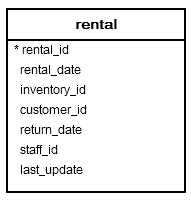
You can count the number of rentals by month by using the date_trunc function as follows:
SELECT
    date_trunc('month', rental_date) m,
    COUNT (rental_id)
FROM
    rental
GROUP BY
    m
ORDER BY
    m;
In this query, the date_trunc function truncates the rental date to month part. The COUNT function counts the number of rentals and the GROUP BY clause groups the rentals by month.
        month        | count
---------------------+-------
 2005-05-01 00:00:00 |  1156
 2005-06-01 00:00:00 |  2311
 2005-07-01 00:00:00 |  6709
 2005-08-01 00:00:00 |  5686
 2006-02-01 00:00:00 |   182
(5 rows)
Similarly, you can count the number of rentals by staff per year as follows:
SELECT
	staff_id,
	date_trunc('year', rental_date) y,
	COUNT (rental_id) rental
FROM
	rental
GROUP BY
	staff_id, y
ORDER BY
	staff_id
The following shows the output:
 staff_id |          y          | rental
----------+---------------------+--------
        1 | 2006-01-01 00:00:00 |     85
        1 | 2005-01-01 00:00:00 |   7955
        2 | 2005-01-01 00:00:00 |   7907
        2 | 2006-01-01 00:00:00 |     97
(4 rows)
In this tutorial, you have learned how to use the PostgreSQL date_trunc function to truncate a timestamp or an interval value.
See more
PostgreSQL Tutorial: Date Functions
PostgreSQL Documentation: Date/Time Functions and Operators