

August 3, 2023
Summary: In this tutorial, you’ll learn how to use PostgreSQL SUM() function to calculate the sum of a set of values.
Table of Contents
Introduction to PostgreSQL SUM() function
The PostgreSQL SUM() is an aggregate function that returns the sum of values or distinct values.
The syntax of the SUM() function is as follows:
SUM(DISTINCT expression)
The SUM() function ignores NULL. It means that SUM() doesn’t consider the NULL in calculation.
If you use the DISTINCT option, the SUM() function calculates the sum of distinct values.
For example, without the DISTINCT option, the SUM() of 1, 1, 8, and 2 will return 12. When the DISTINCT option is available, the SUM() of 1, 1, 8, and 2 will return 11 (1 + 8 + 2). It ingores the one duplicate value (1).
If you use the SUM function in a SELECT statement, it returns NULL not zero in case the SELECT statement returns no rows.
PostgreSQL SUM() function examples
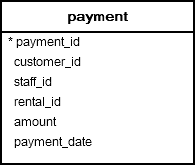
We’ll use the payment table in the sample database to demonstrate the functionality of the SUM function.
1) Using PostgreSQL SUM() function in SELECT statement example
The following statement uses the SUM() function to calculate the total payment of the customer id 2000.
SELECT SUM (amount) AS total
FROM payment
WHERE customer_id = 2000;
 total
-------
  null
(1 row)
Since no row in the payment table has the customer_id 2000, the SUM() function returns a NULL.
If you want the SUM() function to return zero instead of NULL in case there is no matching row found, you use the COALESCE function.
The COALESCE() function returns the first non-null argument. In other words, it returns the second argument if the first argument is NULL.
The following query illustrates how to use the SUM() function with the COALESCE() function:
SELECT
    COALESCE(SUM(amount),0) AS total
FROM
    payment
WHERE
    customer_id = 2000;
 total
-------
     0
(1 row)
2) Using PostgreSQL SUM() function with GROUP BY clause
To calculate the summary of every group, you use the GROUP BY clause to group the rows in the table into groups and apply the SUM() function to each group.
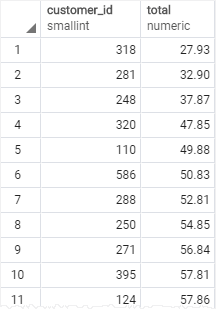
The following example uses the SUM() function with the GROUP BY clause to calculate the total amount paid by each customer:
SELECT
	customer_id,
	SUM (amount) AS total
FROM
	payment
GROUP BY
	customer_id
ORDER BY total;
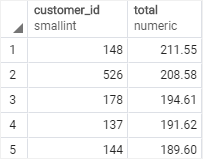
The following query returns top five customers who paid the most:
SELECT
	customer_id,
	SUM (amount) AS total
FROM
	payment
GROUP BY
	customer_id
ORDER BY total DESC
LIMIT 5;
3) Using PostgreSQL SUM function with HAVING clause
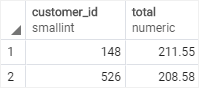
To filter the sums of groups based on a specific condition, you use the SUM function in the HAVING clause.
The following example returns the customers who paid more than $200:
SELECT
	customer_id,
	SUM (amount) AS total
FROM
	payment
GROUP BY
	customer_id
HAVING SUM(amount) > 200
ORDER BY total DESC
4) Using PostgreSQL SUM with expression
See the following rental table from the sample database:

The following statement uses the SUM() function to calculate total rental days:
SELECT SUM(return_date - rental_date )
FROM rental;
           sum
-------------------------
 71786 days 190098:21:00
(1 row)
How it works.
- First, calculate the rental duration by subtracting the rental date from the return date.
- Second, apply the
SUM()function to the expression.
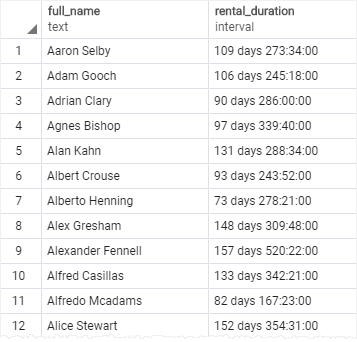
The following example uses the SUM() function to calculate the total duration by customers:
SELECT first_name || ' ' || last_name full_name,
	   SUM(return_date - rental_date ) rental_duration
FROM rental
INNER JOIN customer USING(customer_id)
GROUP BY customer_id
ORDER BY full_name;
Summary
- Use the
SUM()function to calculate the sum of values. - Use the
DISTINCToption to calculate the sum of distinct values. - Use the
SUM()function with theGROUP BYclause to calculate the sum for each group.
See more
PostgreSQL Tutorial: Aggregate Functions
PostgreSQL Documentation: Aggregate Functions