

By John Doe July 27, 2026
Summary: In this article, we will use a real-world case study to explain the read replica lock-blocking issues caused by VACUUM shrinking table files.
Table of Contents
Problem Background
Business Scenario: The customer uses a PostgreSQL read replica to handle read queries, requiring a query latency SLA of under a few seconds. The primary database workload involves a partitioned table with 16 hash partitions, which undergoes frequent large DELETE batches followed by data refreshes using the COPY command.
Symptoms: SELECT queries on the read replica periodically timed out, failing to meet the SLA.
Initial Troubleshooting: The startup process on the replica randomly requested an exclusive lock on a specific partition. This lock blocked all SELECT queries targeting that partition, leading to timeouts. Furthermore, the appearance of this lock strongly correlated with the autovacuum execution cycle on the primary instance.
Root Cause Analysis
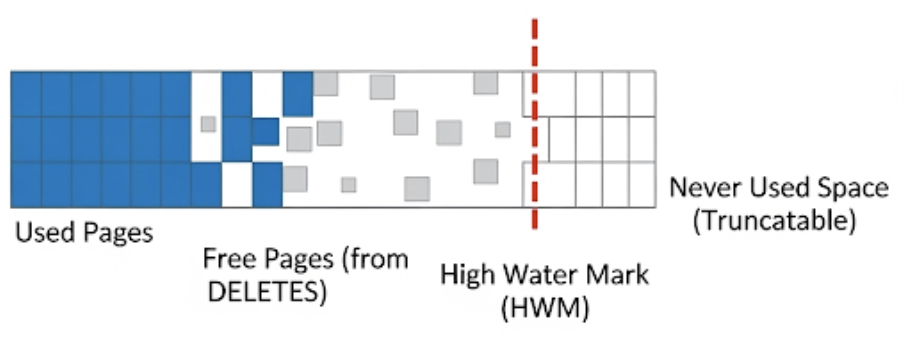
After PostgreSQL’s VACUUM cleans up dead tuples, it attempts to return contiguous free pages at the end of the table (i.e., the empty space beyond the High Water Mark) back to the operating system. This table file truncation operation requires an exclusive lock on the table on the primary instance.
Once the primary node successfully truncates the table file, it records this modification in the WAL (Write-Ahead Log). When the Startup process on the replica replays this log, to ensure strict physical file consistency between the primary and the replica, it must acquire an AccessExclusiveLock on the table on the replica.
Consequences:
- Blocking New Requests: The Startup process’s request for an exclusive lock enters the lock queue, which directly blocks all subsequent newly initiated
SELECTqueries on the replica. - Killing Existing Requests: If there happens to be a long-running query executing on the replica, the Startup process will wait for a fixed period (controlled by the
max_standby_streaming_delayparameter). Once it times out, to prevent the replica’s data lag from growing too large, PostgreSQL forcefully cancels the running read query, throwing the infamouscanceling statement due to conflict with recoveryerror.
Solution
Adjust the parameters for all partitions of the partitioned table to disable the automatic truncation feature of VACUUM:
ALTER TABLE [table name / partition name] SET (vacuum_truncate = false);
Trading Space for Stability: After disabling automatic truncation, the free space at the end of the table file is not returned to the operating system, and the physical file will not shrink. However, this space remains in the file and can be reused by future INSERT or UPDATE operations on the table. This completely eliminates the read query blocking issues caused by the primary instance releasing locks and the replica replaying them.
To strike a balance between “avoiding lock blocking” and “reclaiming disk space,” we can monitor and manage this based on the pg_freespacemap extension:
By installing the pg_freespacemap extension and writing a custom PL/pgSQL function show_empty_pages, we can reverse-scan the table’s pages, locate the High Water Mark (HWM), and calculate the number of truncatable free pages at the end of the table along with their corresponding space size.
If monitoring reveals that the table size continues to grow and there is excessive free space at the end, you can manually execute a VACUUM with the truncate option during off-peak hours to reclaim space:
VACUUM (verbose, truncate true) [schema].[table name];
When executing this command, you will see an additional message in the VACUUM output indicating that VACUUM has truncated the table file:
INFO: table "large_table": truncated 302534 to 302233 pages
The Business-First Principle During VACUUM Truncation
To avoid blocking normal business operations on the primary node, autovacuum uses a Conditional Lock when attempting to truncate a file.
autovacuum will attempt to acquire an AccessExclusiveLock, but if there are any other business operations on the table at that moment (e.g., SELECT, INSERT, or UPDATE holding a shared lock), the conditional lock acquisition will fail. Additionally, when reverse-scanning for free space from the end of the table, if it detects new incoming business access requests, VACUUM will also immediately abandon the file truncation attempt and terminate its work. It will not wait indefinitely in the queue, nor will it kill business processes. Therefore, for tables with extremely frequent read and write operations, autovacuum can almost never catch that fleeting idle window, and the physical file size of the table will never decrease.
Summary and Recommendations
There is no universal silver bullet for this issue in PostgreSQL; it requires trade-offs based on your business needs:
- For read replica scenarios with strict SLA requirements, you can disable
vacuum_truncateto avoid lock blocking, while regularly monitoring the free space in table files and manually reclaiming space. - Alternatively, you can reduce the impact of truncation operations by adjusting parameters such as
autovacuumexecution frequency. - The core principle is to understand the side effects of every step in the VACUUM process and make adjustments based on your own business SLAs and storage space requirements.
Of course, you could also consider using Redrock Postgres, which fundamentally solves data bloat issues at the underlying storage and transaction system level.
References
Shane Borden: Understanding High Water Mark Locking Issues in PostgreSQL Vacuums
PostgreSQL Source Code: access/heap/vacuumlazy.c:lazy_truncate_heap()