

By John Doe April 6, 2026
Summary: In this article, we’ll take a look at the freeze issue that comes with high transaction throughput in PostgreSQL, and corresponding solutions.
Table of Contents
Transaction assignments scenario: Use case
As we know, using exception logic in PostgreSQL stored procedures requires subtransactions. We first create a simple function that increases the nesting depth of exception logic based on the specified depth parameter:
CREATE OR REPLACE FUNCTION generate_subtrans_load(p_id int, depth int)
RETURNS void AS $$
BEGIN
    IF depth > 0 THEN
        BEGIN
            PERFORM generate_subtrans_load(p_id, depth - 1);
        EXCEPTION WHEN OTHERS THEN NULL;
        END;
    ELSE
        INSERT INTO penalty_test VALUES (p_id, 'Deep Stack');
    END IF;
END;
$$ LANGUAGE plpgsql;
Next, we use a simple stored procedure to call the above function with exception logic in a loop for testing:
CREATE OR REPLACE PROCEDURE subtrans_test(depth integer)
AS $$
DECLARE
    i int;
    v_target_rows int := 5000;
BEGIN
    DROP TABLE IF EXISTS penalty_test;
    -- Explicitly preserve rows so COMMIT doesn't empty the table
    CREATE TEMP TABLE penalty_test (id int, val text) ON COMMIT PRESERVE ROWS;

    COMMIT;

    FOR i IN 1..v_target_rows LOOP
        PERFORM generate_subtrans_load(i, depth);
    END LOOP;
END $$ LANGUAGE plpgsql;
Construct a prepared transaction, which will prevent the background autovacuum process from advancing the oldest transaction ID in the system by freezing data.
BEGIN;
SELECT pg_current_xact_id();
PREPARE TRANSACTION 't1';
Note: If you need to use prepared transactions, it is recommended that you set the parameter max_prepared_transactions to a value that is at least as large as max_connections. This ensures that each database session can have one pending prepared transaction.
Use pgbench with 8 concurrent sessions to call the above stored procedure:
echo "CALL subtrans_test(128);" > test.sql
pgbench -n --time=7200 --client=8 --jobs=8 -f test.sql
After the above commands have run for a period of time (about 20 minutes), the database throws an error: “database is not accepting commands”, and PostgreSQL enters an outage state.
ERROR:  database is not accepting commands that assign new transaction IDs to avoid wraparound data loss in database "postgres"
HINT:  Execute a database-wide VACUUM in that database.
You might also need to commit or roll back old prepared transactions, or drop stale replication slots.
Note: Before the above error, the database will frequently generate warning messages, such as
WARNING: database "postgres" must be vacuumed within 3000000 transactions. A large amount of this type of logs is likely to cause the system to run out of disk space.
Transaction assignments scenario: How it works
Here’s what happens to the global transaction ID in the database system, when we run the stored procedure in PostgreSQL:
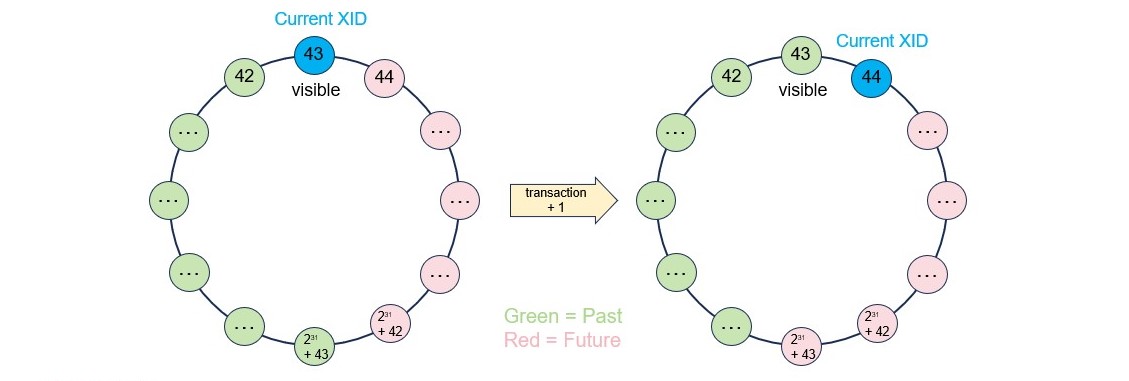
- PostgreSQL uses subtransactions to implement the exception-handling in the stored function.
- Each transaction/subtransaction has a transaction ID, which is a bit like the clock time of a database system.
- Each tuple has two system columns, xmin and xmax, which hold the transaction/subtransaction IDs that inserted and deleted them, respectively.
- The maximum number of transaction IDs is around 2 billion, and after beyond that number, the multi-version concurrency control will not work.
Transaction assignments scenario: Thought
Impact of the issue
- The rows in all tables need to be scanned periodically for transaction ID freezing. The interval is controlled by the autovacuum_freeze_max_age parameter, which defaults to 200 million transactions.
- If there are some long-live transactions or slow queries in the system, the transaction ID will be exhausted and the database will shutdown.
- The system needs to store and manage the state of all unfrozen transactions. The wait events for accessing the cache in pg_xact, pg_subtrans and pg_multixact are prone to occur, and the system performance will be worse.
Freeze Frequency vs. TPS
In PostgreSQL, the frequency of freezing tuples (via VACUUM) is directly proportional to the number of transactions per second (TPS) that modify data (INSERT, UPDATE, DELETE). Because PostgreSQL uses 32-bit transaction IDs (XIDs) that wrap around every ~2 billion transactions, high-throughput systems (high write TPS) require more frequent freezing to prevent data loss (wraparound).
The time taken to reach the maximum autovacuum_freeze_max_age decreases as transaction ID consumption rate increases.
| XID Consumption Rate (per second) | Time to reach 2 billion limit | Time to freeze |
|---|---|---|
| 1,000 | 23 days | 2.3 days |
| 10,000 | 2.3 days | 5.5 hours |
| 100,000 | 5.5 hours | 33 minutes |
| 1,000,000 | 33 minutes | 3.3 minutes |
Note: These figures assume continuous, high-volume write activity and are, in some cases, theoretical to show the impact of extreme transaction throughput.
Solution
- Add a monitoring metric and alarm, to check transaction ID exhaustion.
- Add a monitoring metric and alarm, to check uses of subtransactions.
- Add a monitoring metric and alarm, to check long running transactions.
The solution by Redrock Postgres
Redrock Postgres implemented subtransactions based on the undo record position, these subtransactions are only temporary marks in a transaction. Subtransactions use the same transaction ID as the owning transaction block, they do not need to assign their own transaction IDs, and have no risk to the system.
Besides, in Redrock Postgres, the internal transaction ID is 8 bytes long, and can be used almost infinitely without worrying about running out of transaction IDs. Each transaction will record undo logs, which can be used for rolling back modified data and transactions, making transaction status maintenance and management simpler and more stable.